What's New Here?

Thalaiva All HD Video songs Free Download no watermarks

Directed by A. L. Vijay
Produced by Chandra Prakash Jain
C.P. Sunil
C.P. Dinesh
Written by A. L. Vijay
Starring
Vijay
Sathyaraj
Amala Paul
Ragini Nandwani
Rajiv Pillai
Abhimanyu Singh
N. Santhanam

Music by G. V. Prakash Kumar
Cinematography Nirav Shah
Editing by Anthony
Studio Sri Mishri Productions
Distributed by Vendhar Movies
Release date(s) Uncertain
Running time 185 minutes
Country India


Download Here


Thalaiva All HD Video songs Free Download no watermarks

Posted by Unknown 1 comment

Directed by A. L. Vijay
Produced by Chandra Prakash Jain
C.P. Sunil
C.P. Dinesh
Written by A. L. Vijay
Starring
Vijay
Sathyaraj
Amala Paul
Ragini Nandwani
Rajiv Pillai
Abhimanyu Singh
N. Santhanam

Music by G. V. Prakash Kumar
Cinematography Nirav Shah
Editing by Anthony
Studio Sri Mishri Productions
Distributed by Vendhar Movies
Release date(s) Uncertain
Running time 185 minutes
Country India


Download Here



How to Delete Entire Search History In Facebook


Delete Facebook Search History
Ever searched Facebook to look up that someone special (or not so special for that matter)? Perhaps you just wanted to know when that person's birthday is, or maybe you're looking for an old, embarrassing photo of them. In any case, most people stalk others at one point or another, whether it's just a friend, or a long-time crush. You probably don't remember it (or won't admit it :P), but Facebook does. It keeps a record of your entire creepy search history. And although that history is safely hidden in your account with its privacy set to "Only me", you still never know when your friends might get into your account, which is something you definitelydon't want! Here's how you can delete your entire Facebook search history to prevent yourself from embarrassment.


Deleting Facebook Search History

To delete your Facebook Search History, follow the following steps.
  • Open your Activity Log. This can be found going to your profile, and clicking on the Activity Log button underneath your cover photo.
Activity Log
  • The Activity Log is a history of everything you do on Facebook. From your posts to even the likes and comments you make, everything is stored here. The Activity Log also stores your Search History. So if you've gotten into someone else's account, and you can't find their history to shame them, this is the place you need to look at :P

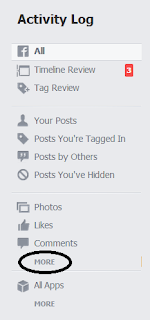
    Look to your left sidebar, and under "Photos", "Likes", and "Comments", you'll see a "More" button. Click to view more options.
Activity log options
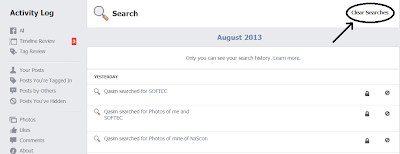
  • Find Search from the list. It'll be at the bottom. Clicking it will show you everything you've searched for, sorted by date. You will also see an option toClear Searches at the top-right corner.
Facebook Search History
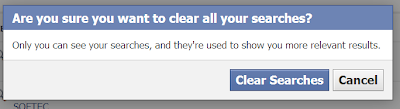
  • Now, all that stands between you and the freedom of a clean-as-a-slate search history is the press of a button. Just click on Clear Searches, and your entire search history will be erased without a trace!|
    Clear Search History


    Please give u r comments frnds....to improve my blog

How to Delete Entire Search History In Facebook

Posted by Unknown 1 comment


Delete Facebook Search History
Ever searched Facebook to look up that someone special (or not so special for that matter)? Perhaps you just wanted to know when that person's birthday is, or maybe you're looking for an old, embarrassing photo of them. In any case, most people stalk others at one point or another, whether it's just a friend, or a long-time crush. You probably don't remember it (or won't admit it :P), but Facebook does. It keeps a record of your entire creepy search history. And although that history is safely hidden in your account with its privacy set to "Only me", you still never know when your friends might get into your account, which is something you definitelydon't want! Here's how you can delete your entire Facebook search history to prevent yourself from embarrassment.


Deleting Facebook Search History

To delete your Facebook Search History, follow the following steps.
  • Open your Activity Log. This can be found going to your profile, and clicking on the Activity Log button underneath your cover photo.
Activity Log
  • The Activity Log is a history of everything you do on Facebook. From your posts to even the likes and comments you make, everything is stored here. The Activity Log also stores your Search History. So if you've gotten into someone else's account, and you can't find their history to shame them, this is the place you need to look at :P

    Look to your left sidebar, and under "Photos", "Likes", and "Comments", you'll see a "More" button. Click to view more options.
Activity log options
  • Find Search from the list. It'll be at the bottom. Clicking it will show you everything you've searched for, sorted by date. You will also see an option toClear Searches at the top-right corner.
Facebook Search History
  • Now, all that stands between you and the freedom of a clean-as-a-slate search history is the press of a button. Just click on Clear Searches, and your entire search history will be erased without a trace!|
    Clear Search History


    Please give u r comments frnds....to improve my blog

How to speech document In adobe Reader

1) Ctrl+Shift+b - to hear the entire           Document
 2)Ctrl+shift+v - to hear the page
 3)Ctrl+shift+c - to pause/resume
4) Ctrl+shift+e - to stop 

How to speech document In adobe Reader

Posted by Unknown No comments

1) Ctrl+Shift+b - to hear the entire           Document
 2)Ctrl+shift+v - to hear the page
 3)Ctrl+shift+c - to pause/resume
4) Ctrl+shift+e - to stop 

How to Enable Task Manager In PC

The first thing a malware will do on your computer is that it will disable the task manager. Now you can’t see the list of malicious processes since you can’t even open the task manager. You press ctrl+alt+delete and nothing happens, what to do now?
Well, don’t panic. Go to Start>Run and copy-paste the following into it, and press enter,
REG add HKCU\Software\Microsoft\Windows\CurrentVersion\Policies\System /v DisableTaskMgr /t REG_DWORD /d 0 /f
Go to Start>Run again, copy-paste the following command in the text box, and press enter,
REG add HKLM\Software\Microsoft\Windows\CurrentVersion\Policies\System /v DisableTaskMgr /t REG_DWORD /d 0 /f
Repeat the process again with the following command,
REG add HKEY_USERS\.default\Microsoft\Windows\CurrentVersion\Policies\System /v DisableTaskMgr /t REG_DWORD /d 0 /f
Enable Task Manager - Get rid of Task Manager has been disabled by your administrator

Note - If while using the above method, you get the error message that “Registry editing has been disabled by your administrator”. This means that the malware on your computer has disabled the registry editor as well. To enable the registry editor again, follow the steps mentioned in this article.

How to Enable Task Manager In PC

Posted by Unknown No comments

The first thing a malware will do on your computer is that it will disable the task manager. Now you can’t see the list of malicious processes since you can’t even open the task manager. You press ctrl+alt+delete and nothing happens, what to do now?
Well, don’t panic. Go to Start>Run and copy-paste the following into it, and press enter,
REG add HKCU\Software\Microsoft\Windows\CurrentVersion\Policies\System /v DisableTaskMgr /t REG_DWORD /d 0 /f
Go to Start>Run again, copy-paste the following command in the text box, and press enter,
REG add HKLM\Software\Microsoft\Windows\CurrentVersion\Policies\System /v DisableTaskMgr /t REG_DWORD /d 0 /f
Repeat the process again with the following command,
REG add HKEY_USERS\.default\Microsoft\Windows\CurrentVersion\Policies\System /v DisableTaskMgr /t REG_DWORD /d 0 /f
Enable Task Manager - Get rid of Task Manager has been disabled by your administrator

Note - If while using the above method, you get the error message that “Registry editing has been disabled by your administrator”. This means that the malware on your computer has disabled the registry editor as well. To enable the registry editor again, follow the steps mentioned in this article.

How to Increase Your Booting Speed

1. Go to run and type Regedit and press Enter.
2. Go to \My Computer\HKEY_LOCAL_MACHINE\SOFTWARE\Microsoft\Windows\CurrentVersion\Run and the delete all this are there.
3. Reboot your system and get speed up.

How to Increase Your Booting Speed

Posted by Unknown No comments

1. Go to run and type Regedit and press Enter.
2. Go to \My Computer\HKEY_LOCAL_MACHINE\SOFTWARE\Microsoft\Windows\CurrentVersion\Run and the delete all this are there.
3. Reboot your system and get speed up.

Facebook Messenger for pc


STEP 1
 First of all download FACEBOOK MESSENGER from here .

Click Here To Download
http://fs32.filehippo.com/5497/7bbc1f5bb8e6464591eeff16ea5b1e2d/FacebookMessengerSetup.exe


STEP 2
 Now install it on your PC

STEP 3.
After complete installation just login to your facebook acccount (Note- You need internet connection for this).


Facebook Messenger for pc

Posted by Unknown No comments


STEP 1
 First of all download FACEBOOK MESSENGER from here .

Click Here To Download
http://fs32.filehippo.com/5497/7bbc1f5bb8e6464591eeff16ea5b1e2d/FacebookMessengerSetup.exe


STEP 2
 Now install it on your PC

STEP 3.
After complete installation just login to your facebook acccount (Note- You need internet connection for this).


How to Generate animated Text on Facebook

STEP 1:
First of all open this  link  in your pc


http://smileychatcodes.com/

STEP 2
Now select your font & write your message in upper box.


STEP 3:
It'll convert your text in  facebook chat code.


STEP 4:

Copy  And Paste Your code in the text

How to Generate animated Text on Facebook

Posted by Unknown No comments

STEP 1:
First of all open this  link  in your pc


http://smileychatcodes.com/

STEP 2
Now select your font & write your message in upper box.


STEP 3:
It'll convert your text in  facebook chat code.


STEP 4:

Copy  And Paste Your code in the text

How to change the facebook Theme

Hey friends, as we all know Mark Zuckerberg and his creation, Facebook. But do you know why it is blue? Because Mark is color blind and can only see blue color. So, what if you are bored of that old blue color and
try something new. Yes! We have something for you. Now you can change facebook theme. How? Just follow the steps given below:
Firstly, you must have Google Chrome, if not, download by googling it.

Now download this, this is the add-on for the theme. It just takes 10 secs. to install.
It will just add the extension and theme is applied.


Theme download from google chrome store:

everplex youtube dark+black thEME

How to change the facebook Theme

Posted by Unknown No comments

Hey friends, as we all know Mark Zuckerberg and his creation, Facebook. But do you know why it is blue? Because Mark is color blind and can only see blue color. So, what if you are bored of that old blue color and
try something new. Yes! We have something for you. Now you can change facebook theme. How? Just follow the steps given below:
Firstly, you must have Google Chrome, if not, download by googling it.

Now download this, this is the add-on for the theme. It just takes 10 secs. to install.
It will just add the extension and theme is applied.


Theme download from google chrome store:

everplex youtube dark+black thEME

How to find who is unfriend on you on facebook

STEP 1:
First of all, You need A Pc with any of given browser installed on it (Chrome, Firefox, Opera, Internet Explorer, Safari)

STEP 2:
Now visit   Below t his Link
http://www.unfriendfinder.net/
download   from your browser.

STEP 3:
Here you'll get an extension for your browser with full installation steps.
Just follow them & install UNFRIEND FINDER on your browser.

STEP 4:
After you installed facebook Unfriend Finder Extension on your browser then just restart it.

STEP 5:

Now goto facebook.com & login to your account, here you'll see one more option

STEP 6:
Just click on it and see who unfriended you on fb, you can also check who ignored your friend request & who deactivated his/her account, etc via notifications.


[Note - You can use this trick only on that browser on which you have installed this UNFRIEND FINDER extension]

How to find who is unfriend on you on facebook

Posted by Unknown 1 comment

STEP 1:
First of all, You need A Pc with any of given browser installed on it (Chrome, Firefox, Opera, Internet Explorer, Safari)

STEP 2:
Now visit   Below t his Link
http://www.unfriendfinder.net/
download   from your browser.

STEP 3:
Here you'll get an extension for your browser with full installation steps.
Just follow them & install UNFRIEND FINDER on your browser.

STEP 4:
After you installed facebook Unfriend Finder Extension on your browser then just restart it.

STEP 5:

Now goto facebook.com & login to your account, here you'll see one more option

STEP 6:
Just click on it and see who unfriended you on fb, you can also check who ignored your friend request & who deactivated his/her account, etc via notifications.


[Note - You can use this trick only on that browser on which you have installed this UNFRIEND FINDER extension]

How to set Zoom Effect for Facebook Photos

Step 1:

First you need google chrome for this trick.If u have already then follow the second step.

Step 2:

Open New tab paste the below Link 

https://chrome.google.com/webstore/detail/elioihkkcdgakfbahdoddophfngopipi

Now add zoom effect extension to your google chrome 

Step 3:

Now open your facebook account and take the cursor on any pic and see the result.


Plz comment u r opinion

How to set Zoom Effect for Facebook Photos

Posted by Unknown No comments

Step 1:

First you need google chrome for this trick.If u have already then follow the second step.

Step 2:

Open New tab paste the below Link 

https://chrome.google.com/webstore/detail/elioihkkcdgakfbahdoddophfngopipi

Now add zoom effect extension to your google chrome 

Step 3:

Now open your facebook account and take the cursor on any pic and see the result.


Plz comment u r opinion

Latest Tweets

GET ALL UPDATES VIA FACEBOOK JUST CLICK Like BUTTON


[X] I'm Already A FAN
+Get this at Wapchoice.In
Blogger templates. Proudly Powered by Wapchoice Lokesh.
back to top